


The Roku Home Monitoring System SE is an excellent option for people looking for an easy-to-use & affordable home security system.
So, if you are thinking of setting up a home monitoring system and tracking what’s happening from anywhere, here are the details about the Roku Home Security System.
What’s There In The Roku Home Monitoring System SE?
The Roku Home Monitoring System SE is a self-monitored device that costs $99.
Roku has a lucrative offer of 50 percent off for the first year only if you sign up for their annual plan, which costs $150 for the monitoring system.
The entire package of the Roku Home Security System includes:
-
Monitoring Hub:
The Roku monitoring hub is like a command center for your entire Roku security system.
The hub has a built-in siren that notifies the house and neighborhoods when it detects any emergency.
The system’s alarm is built into this hub. It connects the system to your Wi-Fi and sends you notifications on your Smartphone.
It provides a 10-hour battery life during power loss and is the only component connecting to the power source.
-
Roku Motion Sensor:
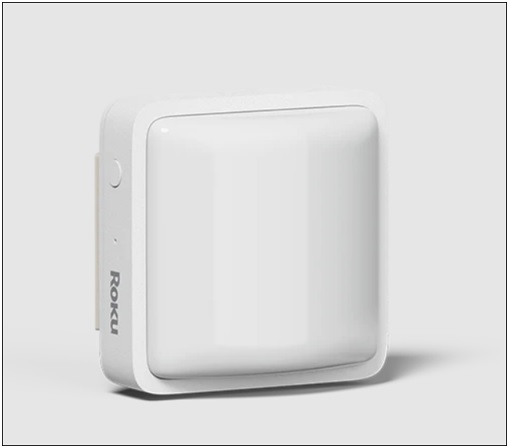
When motion is detected, you get notified, or a light is turned on.
-
Two Roku Entry Sensors:
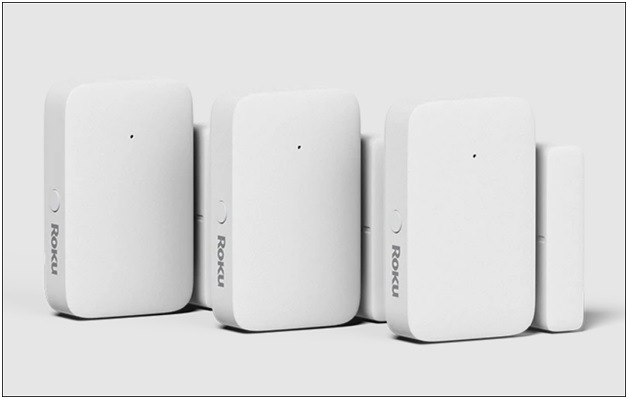
You get a notification on your phone whenever any door or window is opened or closed.
-
Roku Keypad:
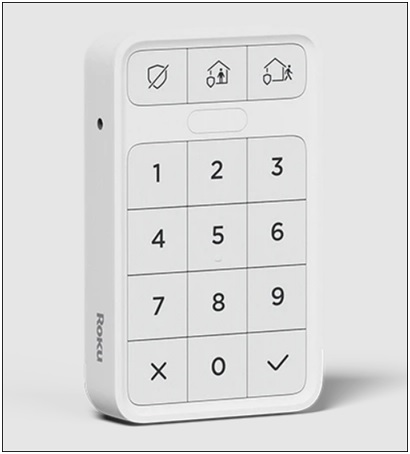
With the Roku keypad, you can arm or disarm your home easily, manually change the sound of the alarm, or change modes.
The keypad can be placed anywhere in your home, and the sensors can be placed on doors and windows.
Roku also offers adapters, Window decals (x2), USB and Ethernet cables, AA and AAA batteries, and a Screw kit.
How Roku Provides Home Security Monitoring?
Roku allows you to take complete control of the security of your home from anywhere. Here is how Roku does it:
-
Easy Installation:
You can install and monitor the entire Roku security system using the Roku home app. Roku provides users with guided videos and detailed illustrations for a hassle-free installation.
The UI is made user-intuitive, keeping that in mind. You can instantly get the system up and running. You can monitor your home.
-
24/7 Hours Monitoring:
Roku has partnered with Noonlight, the leading developer of professional home monitoring and safety products, to provide you with 24/7 home monitoring support.
Roku offers an immediate response from the live US agents whenever an alarm is triggered.
The users can request emergency assistance with just one tap on the keyboard or the Roku Smart Home mobile app.
The professional monitoring system is available for $9.99 per month and $99.99 for a year.
-
Monitoring From Roku TV:
Roku has integrated its home security system with Roku TV and Roku player.
This helps send alerts to the TV when a sensor is triggered.
When you arm the alarm, you see a display of the alarm countdown on the monitor.
So, after installing the system, you can use the Roku Smart Home app to arm and disarm the alarm, see live video from the motion sensor, and receive alerts. It also provides emergency help when the alarm goes off.
A live agent will text you to find out if you really need any further assistance.
Not only this, but if they receive no response from you, the agent sends emergency responders immediately to your home.
-
Tracking The Events Via Roku Camera:
Roku has taken a step ahead by adding event history to the Roku Cameras app.
So, from now on, in addition to viewing live streams from connected doorbells & cameras, you can track any recorded events.
The app will download all the recordings to the Roku TV in the Events tab.
To use the facility, you need a Roku Smart Home subscription that costs $3.99 a month per camera and $9.99 for multiple cameras.
The Roku camera app automatically gets downloaded to your Roku TV or Roku player.
Roku has also introduced a Solar Panel to charge the battery-powered Roku Outdoor camera SE for $24.99.
The Roku cameras and doorbells work fine with the Roku Camera app. So you can track all the camera events from the monitor.
-
Controlling With Voice:
Roku is also rolling out a voice control integration via Smart Home app or Roku remote.
With this, you can control the smart plugs Roku lights and tweak the color or brightness.
The voice integration works through Roku Voice only.
You can use compatible speakers to control the Roku smart home devices using Google Assistant and Alexa.
You can speak into the Roku mobile app and Roku voice remote to check on the Roku camera feed or control the Roku smart plugs on the Roku TV or Roku Player.
What Are The Pros And Cons Of The Roku Home Monitoring System SE?
After using the Roku Home Monitoring System, we discovered some pros and cons. Here we enlist them for your convenience:
Pros:
- Affordable
- Easy to install and use
- Compatible with all your Roku devices
- Easy Motion detection
- Live video from the motion sensor
- Receive alerts and instant notifications
- Long battery Life
Cons:
- Competitors offer more sensors for comprehensive cover
- No cloud storage for video recording
Overall, the Roku Home Monitoring System SE is a good option for people who are looking for an affordable and easy-to-use home security system.
Roku also allows you to add motion sensors, entry sensors, and keypads from Roku.com.
Frequently Asked Questions [FAQs]
1. Can I use the Roku camera without a subscription?
You can use the Roku camera for still photos and images without the subscription.
The Roku Home security system does not need to use the essential functions of the Roku cameras.
2. Does Roku have a monthly fee?
Roku does not have a monthly fee, but some of the services and channels available on the platform require a subscription.
3. Is Roku device safe? Can hackers hack a Roku device?
Ensure that you are always on Roku official website. The hackers can hack any device connected to our internet.
To protect you account, you should secure them with a password, including your Wi-Fi connection.
Wrapping Up
While this was our experience, we would love to hear from you. What do you think about the Roku Home Security system? Feel free to inform us in the comments section provided below.