


In the rapidly evolving landscape of technology, where every digital interaction hinges on speed, security, and reliability, a significant player has emerged to redefine the way we access the internet: Cloudflare’s 1.1.1.1. This seemingly simple sequence of numbers holds immense significance in the tech world, as it represents a groundbreaking DNS resolver that has captured the attention of users worldwide.
DNS, or Domain Name System, serves as the digital address book of the internet, translating human-readable domain names into machine-readable IP addresses. In this intricate web of connectivity, the introduction of 1.1.1.1 has introduced a new paradigm. Its role extends far beyond just resolving website addresses – it’s a catalyst for enhanced performance, increased privacy, and fortified security in our online experiences.
Here is a deep dive into 1.1.1.1 DNS Resolver for Internet safety.
1.1.1.1 is a DNS resolver – what does that mean exactly?
Nearly everything on the internet starts with a DNS request.
Every domain name on the internet has at least one IP address. While the IP addresses for a domain might change at any time, the domain names never change.
The Domain Name System (DNS) serves as an up-to-date index book for these IP addresses on the internet.
A DNS Resolver converts domain names to their respective IP addresses. When a user types a domain name in their browser, it generates a DNS request.
A DNS Resolver handles this DNS request and converts the domain name to its IP address by requesting the IP address from the DNS; it then sends the data back to the user’s computer. The DNS server used by your computer is usually determined by your internet service provider (ISP).
The user’s computer then sends another request to the IP address, which sends back the website data.
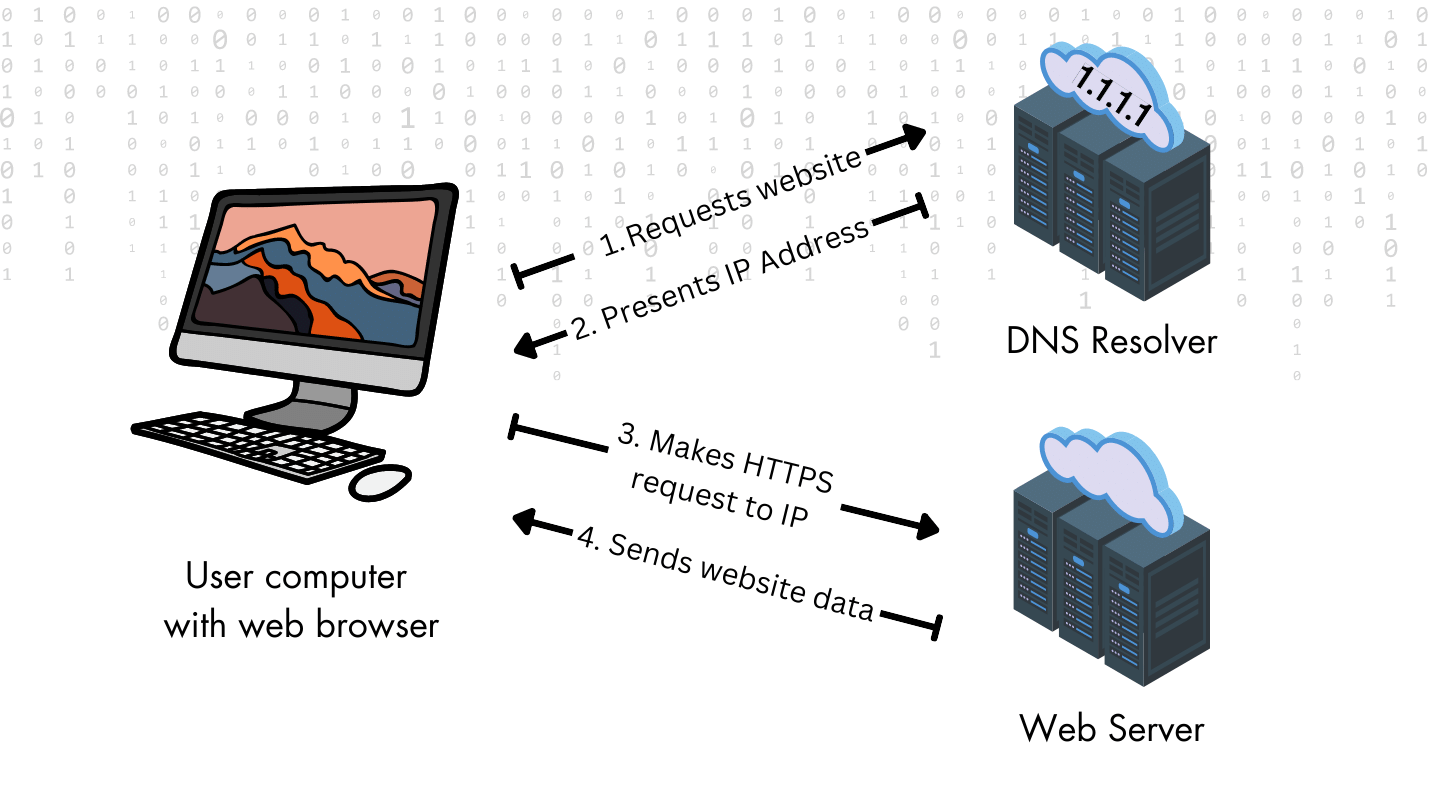
1.1.1.1 is a DNS resolver. It was developed by Cloudflare in partnership with the Asia Pacific Network Information Centre (APNIC) in an experiment to understand how DNS can be improved in terms of performance, privacy, and security.
At its core, it functions exactly like that, converting domain names to IP addresses. However, it stands apart from other DNS resolvers in two aspects – speed and privacy.
While conventional DNS services often prioritize expediency at the expense of security, 1.1.1.1 seeks to strike a harmonious balance between the two, presenting an excellent alternative in the field of DNS resolution.
It does so with the help of the Anycast network, which is explained in brief below.
How 1.1.1.1 achieves better speeds with Anycast routing?
The Internet Protocol (IP) handles requests using three primary types of addressing schemes – Unicast, Multicast, and Anycast.
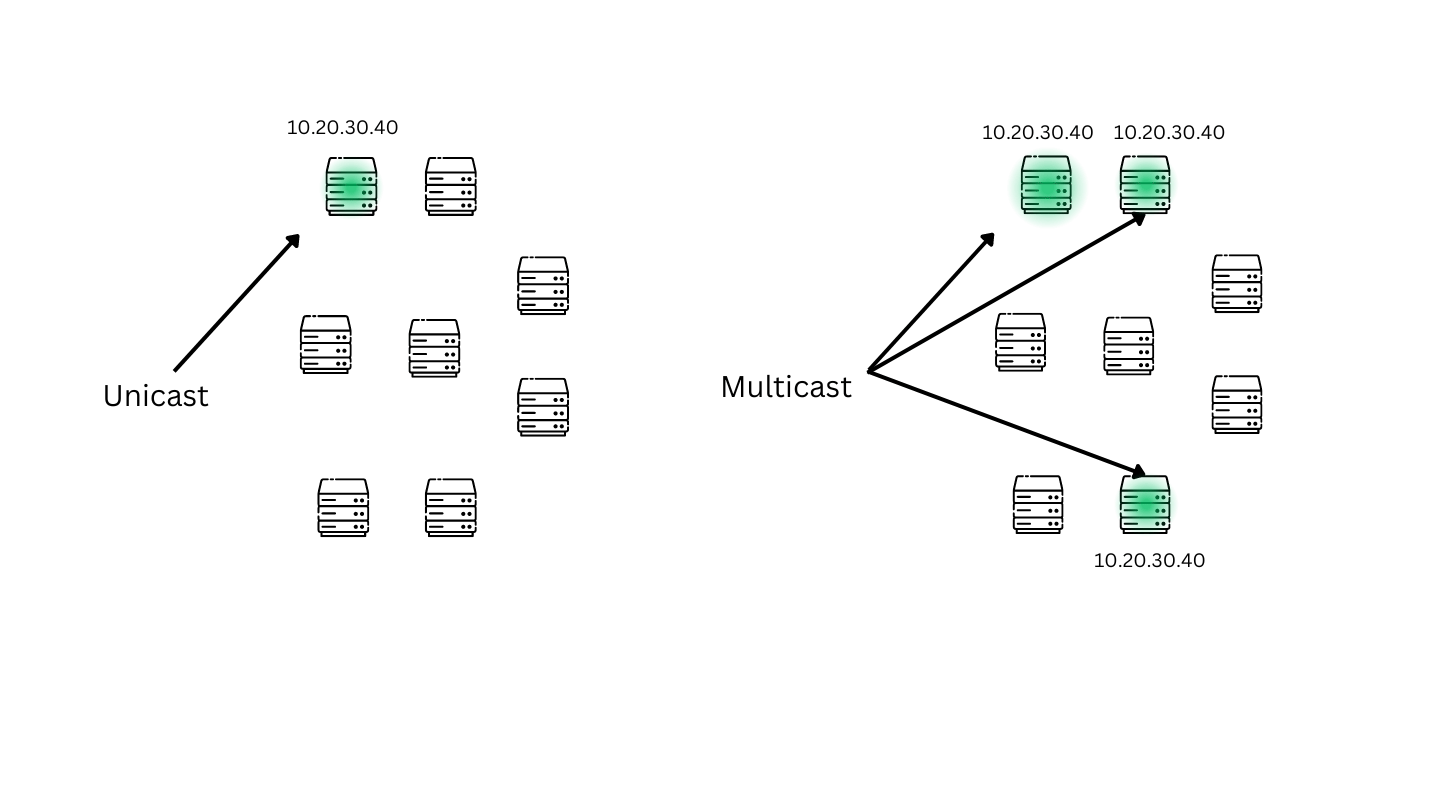
As the name suggests, Unicast is used to identify a single, unique host and send data in a one-to-one transmission mode.
Similarly, Multicast is used to send data to multiple physical server destinations in one-to-many transmission mode. Class D IP addresses are reserved specifically for multicast communications. Every IP packet sent to a multicast address will be delivered to only those hosts that have joined these multicast groups. Others will reject the packet at the hardware level, thereby reducing bandwidth and network overhead.
On the other hand, Anycast allows multiple servers to share IP addresses, enabling more than one physical server to be identified as the same IP address. Anycast routers consider the user request location and conduct a least-cost analysis to send data packets to select the destination server.
Cloudflare’s 1.1.1.1 DNS Service operates recursive name servers (servers that query the DNS instead of the local ISP) using the Anycast routing.
Pros of Using 1.1.1.1
Compared to traditional DNS resolvers, Cloudflare’s solution offers some significant benefits. These include:
A. Faster internet browsing and reduced latency.
Your ISP’s DNS Resolvers can sometimes be overloaded due to heavy traffic – in some situations, they might stop responding to requests altogether. The Anycast network architecture and Cloudflare’s robust infrastructure pave the way for swift DNS resolution, resulting in significantly faster website loading times. The Anycast network also reduces latency by selecting the closest physical server, ensuring smoother online interactions, which is crucial for streaming, online gaming, and real-time communication.
B. Enhanced privacy protection and data encryption.
ISPs do not always use strong encryption on their DNS or support the DNSSEC security protocol, making their DNS queries vulnerable to data breaches. 1.1.1.1 stands as a guardian of user privacy, adhering to a strict no-logs policy that safeguards browsing history from being tracked or stored. DNS over HTTPS (DoH) and DNS over TLS (DoT) encryption protocols add layers of security, shielding users from potential eavesdropping or tampering. This elevated privacy framework aligns with the data protection standards upheld globally, resonating with users’ growing concerns about online privacy.
By employing robust encryption and security measures, 1.1.1.1 fortifies users against DNS cache poisoning, spoofing, and other malicious attacks targeting DNS vulnerabilities. It acts as a digital sentry, bolstering cybersecurity defenses and minimizing the risks of falling victim to online threats.
D. Compatibility with various devices and platforms.
1.1.1.1’s versatility extends across a wide spectrum of devices and operating systems, ensuring consistent and optimized experiences on laptops, smartphones, tablets, and other internet-connected devices. As of writing, 1.1.1.1 is available for Windows, MacOS, Android, iOS, and Linux. This compatibility eliminates the fragmentation often associated with DNS services, enhancing user convenience and streamlining digital interactions.
Cons of Using 1.1.1.1
A. Possible issues with accessing localized content.
While 1.1.1.1 emphasizes speed and privacy, its global infrastructure might occasionally route users’ requests through servers located farther away. This routing mainly depends on the request type and the request origin’s location. Sometimes, this could result in suboptimal access to region-specific or localized content, impacting users’ ability to engage with content tailored to their location fully.
B. Limited customization compared to some other DNS services.
1.1.1.1 is designed with simplicity in mind, offering a straightforward and efficient DNS resolution process. However, this streamlined approach might lack the extensive customization options certain other DNS services offer. Users accustomed to intricate configuration settings might find 1.1.1.1’s minimalistic approach limiting in terms of tailoring their DNS experience.
C. Reliance on Cloudflare’s infrastructure for service availability.
1.1.1.1 is operated by Cloudflare, a single entity responsible for its infrastructure and service availability. This centralization raises concerns about potential outages or disruptions that could impact users’ ability to access websites if Cloudflare experiences technical issues. Users reliant on 1.1.1.1 might need contingency plans in case of service interruptions, particularly if their work or activities are time-sensitive.
D. Certain ISPs may block 1.1.1.1
Unfortunately, 1.1.1.1 is blocked by multiple ISPs and networks. The address is often deemed way too simple, raising suspicions that it might have been used in the past illegitimately for testing purposes. Moreover, since it is not exactly a VPN (although CloudFlare has recently launched WARP, a VPN service inside the DNS Resolver), using 1.1.1.1 is not exactly foolproof, and your data can still be stolen.
Conclusion
Among growing concerns of privacy and data security, services like 1.1.1.1 are making the internet safer for users across the world.
However, your ISP will still know your internet activity irrespective of the DNS resolver you use if they really want to. 1.1.1.1 is not really a VPN service, so your data is traceable, and people with malicious intentions can still find your information if you are not careful.
If you want to try 1.1.1.1 for your computer or smartphone, go to this link and try the app yourself. It is free to use, and there is no real harm in trying a DNS Resolver unless your ISP blocks it.
Let us know your thoughts on DNS Resolvers in the comments below.